Marketing Campaign Gantt Chart
The code
gantt
  title Product Marketing Campaign
  dateFormat YYYY-MM-DD
  axisFormat %b %d
  section Prep
    Messaging and positioning :p1, 2026-04-01, 6d
    Landing page copy :p2, after p1, 5d
  section Content
    Blog series :c1, after p2, 10d
    Email sequence :c2, after p2, 7d
    Social assets :c3, after p1, 8d
  section Launch
    Press outreach :l1, after c1, 4d
    Launch day :milestone, after l1, 0d
    Post-launch reporting :l2, after l1, 7d
How this template works
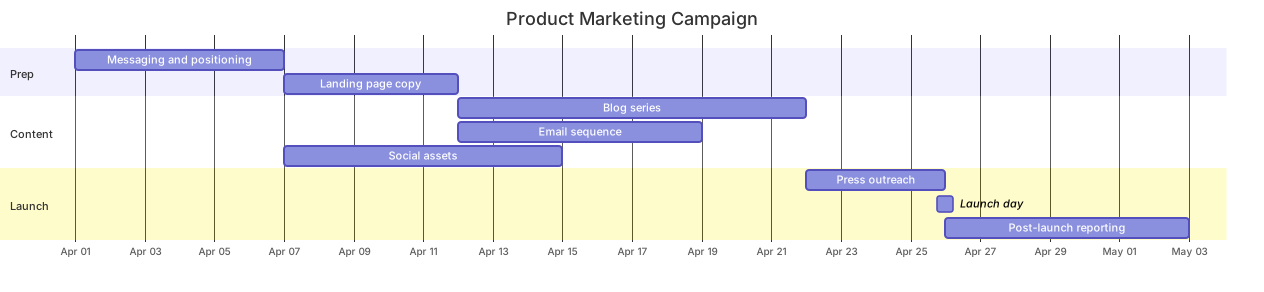
A marketing campaign is a scheduling problem with two shapes of work: a sequential spine — positioning before copy, copy before launch — and a fan of parallel content production. This template shows both in one chart, which is exactly the picture a marketing lead needs when a stakeholder asks why launch day sits where it does.
The syntax is the standard Gantt skeleton with an emphasis on parallelism. gantt, title Product Marketing Campaign, dateFormat YYYY-MM-DD, and axisFormat %b %d work as in every Gantt here. The Prep section runs sequentially: Messaging and positioning :p1, 2026-04-01, 6d, then Landing page copy :p2, after p1, 5d. The Content section is where the fan happens: Blog series :c1, after p2, 10d and Email sequence :c2, after p2, 7d share the same predecessor and therefore start on the same day, while Social assets :c3, after p1, 8d branches earlier, off positioning alone. In the Launch section, Press outreach :l1, after c1, 4d waits for the blog series — the longest content task — and Launch day :milestone, after l1, 0d marks the moment. Note the last line: Post-launch reporting :l2, after l1, 7d starts from a milestone’s id, which is legal and the cleanest way to schedule follow-up work.
The gotcha specific to this diagram: the colon in a task line is the boundary between the display name and the attribute list, so a task name containing a colon — “Copy: homepage hero” — breaks parsing or swallows the attributes that follow. Keep colons out of task names. Second, everything downstream of a long task slides with it: if the blog series slips from 10d to 15d, press outreach and launch day move automatically. That is the feature and the warning — the chart will not tell you the launch is at risk unless you look.
To adapt it, rename the sections to your funnel stages, add a Paid section for ad creative, and pin the milestone to a fixed date if launch day is already public. Content teams usually duplicate the Content section per channel.
Related templates: the website launch plan for the engineering side of the same launch, the product sprint plan for the delivery cadence feeding it, and the product launch timeline for the month-level story you show executives. Full reference: the Gantt diagram guide.
Variations to try
- Add a Paid section for ad creative and budget approval if paid channels are part of the plan.
- Pin Launch day to a fixed date instead of chaining it after press outreach when the date is already public.