30-60-90 Day Onboarding Plan
The code
gantt
  title 30-60-90 Day Onboarding Plan
  dateFormat YYYY-MM-DD
  axisFormat %b %d
  section First 30 days
    Meet the team :d1, 2026-05-04, 5d
    Learn the product :d2, after d1, 10d
    First small fix :d3, after d2, 10d
    30-day check-in :milestone, after d3, 0d
  section Days 31 to 60
    Own a feature area :s1, after d3, 15d
    Shadow support rotation :s2, after s1, 10d
    60-day review :milestone, after s2, 0d
  section Days 61 to 90
    Lead a project :t1, after s2, 20d
    Present improvements :t2, after t1, 5d
    90-day review :milestone, after t2, 0d
How this template works
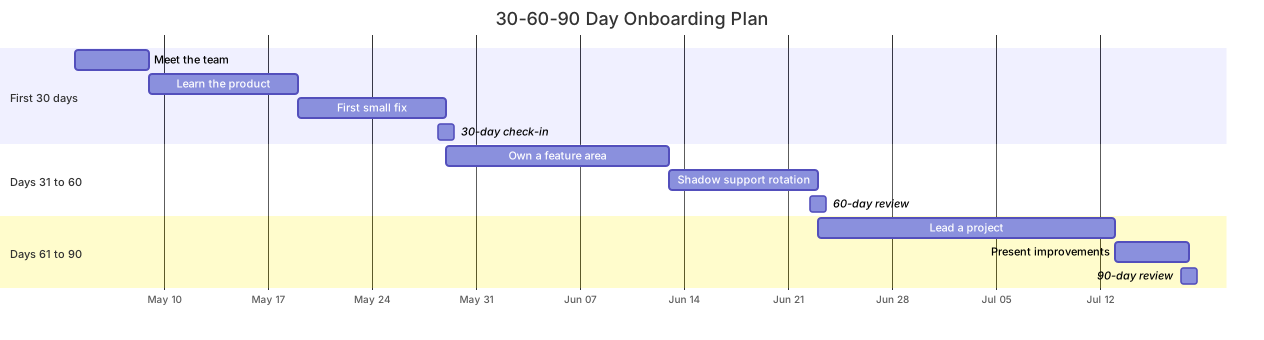
A 30-60-90 plan is a promise about ramp-up, and a Gantt chart is the honest way to make it: three sections, one per phase, each ending in a check-in milestone so that manager and new hire share the same picture of what “on track” means. Hand the rendered chart to the new hire on day one and the conversation stops being about vibes and starts being about dates.
The syntax uses sections as phases and long durations instead of day-level tasks. gantt, title 30-60-90 Day Onboarding Plan, dateFormat YYYY-MM-DD, and axisFormat %b %d open the chart as in any Gantt here. Meet the team :d1, 2026-05-04, 5d anchors the plan to a real start date. The phase then chains: Learn the product :d2, after d1, 10d, First small fix :d3, after d2, 10d, and 30-day check-in :milestone, after d3, 0d closes it with a diamond. The important move is the cross-section chain: Own a feature area :s1, after d3, 15d starts where the first phase’s last task ends. Dependencies may cross section boundaries freely, and that is what keeps the three phases connected instead of floating as three unrelated lists.
The gotcha is id management. Ids are global across the whole chart, so d1 in phase one and s1 in phase two must never collide — with three sections of ids, a naming convention is worth adopting, and this template already follows one: d for days 1-30, s for 31-60, t for 61-90. Second, a ninety-day chart with axisFormat %b %d produces a dense axis; if it feels crowded, switch the axis to %b for month-only ticks while leaving dateFormat unchanged for the task lines.
To adapt it, swap the task names for the role and adjust durations to the seniority — a senior hire skips “Learn the product” and starts at “Own a feature area”. Managers usually duplicate the file per new hire and review it in one-on-ones.
Related templates: the product sprint plan for team-level cadence, the website launch plan for a delivery-shaped dependency chain, and the learning path mindmap for the skills map behind the schedule. Full reference: the Gantt diagram guide.
Variations to try
- Swap the task names for the role — an engineer gets first pull request merged, a salesperson gets first demo delivered.
- Compress to a 30-60 plan for contractors by deleting the final section and re-pointing the last milestone.