Feature Branch Git Flow
The code
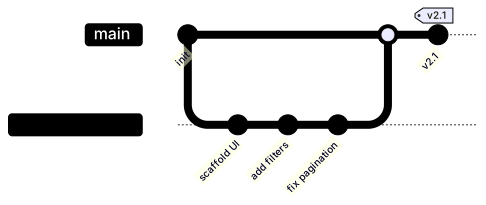
gitGraph
  commit id: "init"
  branch feature-search
  commit id: "scaffold UI"
  commit id: "add filters"
  commit id: "fix pagination"
  checkout main
  merge feature-search
  commit id: "v2.1" tag: "v2.1"
How this template works
The feature-branch workflow is the first thing every team adopts and the first thing every team handbook should diagram: work happens on a branch, main stays clean, and the merge is the moment code becomes product. This template renders that loop in eight lines, which makes it the right starting point for onboarding docs and contribution guides.
The syntax is worth walking through. gitGraph declares the type, and the first commit id: "init" lands on main because main is the default head when a chart begins. branch feature-search creates the branch and moves the head to it, so the next three commits stack on the feature line — that automatic head movement is why there is no checkout between the branch and its commits. commit id: "scaffold UI" labels the node; the id is the text drawn under the commit dot, and unlabeled commits render as plain dots, which is the right treatment for noise. Label the commits that carry meaning and leave the rest anonymous. checkout main moves the head back without creating anything, and merge feature-search — which must run while main is checked out, because a merge always lands on the current branch — draws the merge knot. The final commit id: "v2.1" tag: "v2.1" shows the difference between an id, a label you can put on any commit, and a tag, a marker you reserve for releases.
The gotchas: branch names containing slashes or spaces must be quoted, so branch "feature/search-v2" is legal while the unquoted form is not. checkout refers to branch names, and Mermaid errors if you check out a branch you have not declared — declaration order is execution order. And the classic mistake is merging from the wrong head: if you forget checkout main, the merge lands on the feature branch and the diagram quietly documents a process you do not run.
To adapt it, rename the branch to your convention, add or remove commits to match the real history, and add a second feature branch before the merge to show parallel work.
Related templates: the release flow for the develop-and-main model teams graduate to, the hotfix flow for patching a shipped release, and the CI/CD pipeline flowchart for what happens after the merge. Full reference: the Gitgraph diagram guide.
Variations to try
- Add a second feature branch before the merge to show two workstreams running in parallel.
- Replace the merge with a fast-forward style by deleting the merge line and committing directly on main.