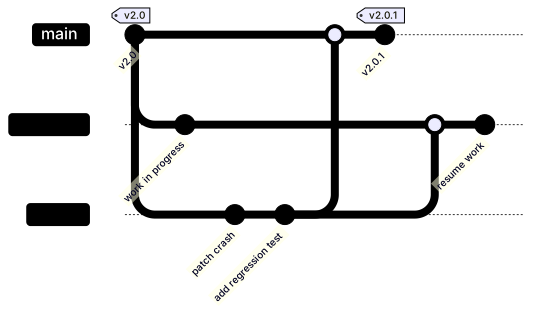
Hotfix Flow Gitgraph
The code
gitGraph
  commit id: "v2.0" tag: "v2.0"
  branch develop
  checkout develop
  commit id: "work in progress"
  checkout main
  branch hotfix
  checkout hotfix
  commit id: "patch crash"
  commit id: "add regression test"
  checkout main
  merge hotfix
  commit id: "v2.0.1" tag: "v2.0.1"
  checkout develop
  merge hotfix
  commit id: "resume work"
How this template works
A hotfix is surgery under time pressure: production is broken, develop holds half-finished work that must not ship, and the fix has to come from main. This template documents the whole maneuver in fifteen lines, including the back-merge into develop that is the step teams forget at two in the morning.
The first line matters more than it looks: commit id: "v2.0" tag: "v2.0" marks the last good release, and tagging the starting point is what makes the diagram readable six months later. branch develop plus a commit of unfinished work shows why the fix cannot come from there. Then checkout main before branch hotfix — that pair is the load-bearing move of the whole chart, because a new branch is cut from the current head, and if your head is on develop, your hotfix is built on top of unfinished work. Two commits follow on the hotfix line, the patch and its regression test, drawn as separate nodes because they should be separate commits in real life too. checkout main, merge hotfix, and commit id: "v2.0.1" tag: "v2.0.1" publish the patch release. The last two lines, checkout develop and merge hotfix, carry the fix back into ongoing work — the same branch merged twice, once into each long-lived line.
The back-merge is two lines in the diagram and one command in real life, and it is the step that decides whether the bug stays fixed: skip it, and the next release cut from develop reintroduces the crash you just patched. Second, branch hotfix while the head is on develop is the exact mistake this diagram exists to prevent — the syntax will not stop you, only the checkout discipline will. Third, a tag renders only on the commit it is attached to, so moving the release marker means editing that line, not adding a new statement.
To adapt it, rename the branches to your convention, add a staging verification commit if your process gates on one, and chain a second hotfix when the first patch misses the root cause.
Related templates: the release flow for the steady-state model this interrupts, the feature branch flow for everyday work, and the incident response flowchart for the human side of the same incident. Full reference: the Gitgraph diagram guide.
Variations to try
- Insert a staging verification commit between the patch and the regression test when your process gates on a staging deploy.
- Chain a second hotfix branch off the patch release if the first fix misses the root cause.