Release Flow with Develop Branch
The code
gitGraph
  commit id: "base"
  branch develop
  checkout develop
  commit id: "feature A"
  commit id: "feature B"
  branch release
  checkout release
  commit id: "bump to v1.4"
  checkout main
  merge release
  commit id: "v1.4" tag: "v1.4"
  checkout develop
  merge release
  commit id: "next cycle"
How this template works
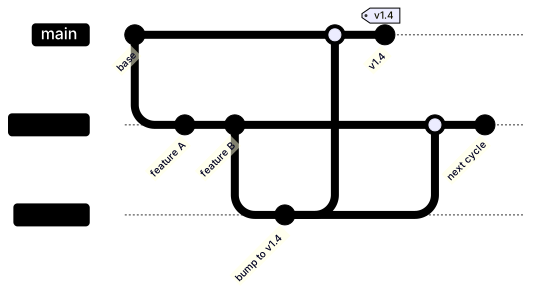
When more than a couple of people ship at once, teams add a develop branch: features accumulate there, a release branch is cut when it is time to ship, and the release is merged into both main and develop. This template draws the full cycle, including the back-merge into develop that keeps release fixes from being lost — the step teams skip and then rediscover as a duplicate bug report.
The syntax has one subtlety worth pausing on: branch develop and checkout develop are two statements. Branching creates the branch, checking out moves the head to it, and in this skeleton the head does not follow automatically — that is why the pair appears together. Two commits land on develop, then branch release cuts the release line from develop, because develop is what is checked out at that moment. commit id: "bump to v1.4" is the version bump that exists only on the release line. checkout main followed by merge release publishes the release, and commit id: "v1.4" tag: "v1.4" marks the release commit with both a label and a tag. Then checkout develop and merge release a second time — the same branch merged twice, once into each long-lived line, which is exactly how the flow works rather than a drawing error.
The gotcha is head discipline. The head is whatever you last checked out, and every subsequent statement runs against it. After merge release on main, the head is still main; skipping checkout develop before the second merge would merge the release into main twice and produce a diagram of a process you do not run. Second, a tag renders only on the commit it is attached to — moving it means editing that line, not adding a new statement.
To adapt it, rename the release branch per version when several release lines stay alive, and insert a hotfix branch between the two merges for late fixes.
Related templates: the feature branch flow for the simpler model this extends, the hotfix flow for patching a shipped release, and the CI/CD pipeline flowchart for automating the merge steps. Full reference: the Gitgraph diagram guide.
Variations to try
- Name the release branch per version, such as release-1-4, when several release lines stay alive at once.
- Insert a hotfix branch between the two merges for late fixes discovered during release testing.