API Authentication Sequence
The code
sequenceDiagram
  autonumber
  actor U as User
  participant C as Client App
  participant A as Auth Server
  participant R as Resource API
  U->>C: Click sign in
  C->>A: Request authorization code
  A-->>C: Authorization code
  C->>A: Exchange code for token
  A-->>C: Access token
  C->>R: Call API with token
  R-->>C: Protected data
  Note over U,R: Token expires after 1 hour
How this template works
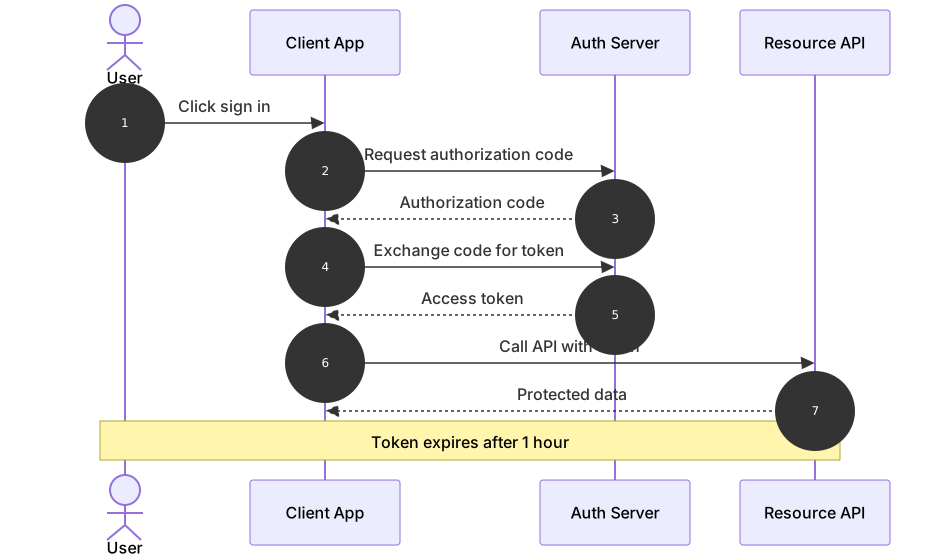
This template shows the OAuth2 authorization code flow, the handshake behind almost every sign-in-with button on the web. Four parties are involved — the user, the client application, the authorization server, and the resource API — and the sequence makes the crucial detail visible: the user never sees the access token, because it travels only between the client and the auth server. Security reviewers use this diagram to verify that no credential takes a shortcut, and backend developers use it to explain to frontend colleagues why the token exchange is a separate request.
The syntax introduces the building blocks of every sequence diagram. sequenceDiagram declares the type. autonumber stamps each message with a running number, which turns the diagram into a checklist you can reference in code review (“step 4 is where the code is exchanged”). actor U as User draws a stick figure, while participant C as Client App draws a box; the word after as is the display name, and the letter before it is the id you use in messages. Requests use the solid arrow ->> and responses use the dashed arrow -->>, so the eye can separate calls from returns even in a long diagram. Finally, Note over U,R: Token expires after 1 hour spans from the first id to the second, placing an annotation across all four lifelines.
The gotcha is the Note participant list. Note over takes the declared ids — U, R — not the display names, so writing Note over User,Resource API fails to parse. The second trap is reusing an id: two participants both named A will merge into one lifeline, and messages will appear to go to the wrong party. Keep ids to single letters or short words and reserve the descriptive text for the as alias.
To adapt it, add the refresh token exchange in an alt block, or insert a browser participant if your redirect flow needs documenting. Keep each message to a short verb phrase; the details belong in the surrounding documentation.
Related templates: the login flow sequence covers the credential check that usually precedes this flow, the microservice call sequence shows the API call that follows a successful auth, and the webhook retry sequence demonstrates the alt and loop blocks you would use for token refresh. The sequence diagram guide has the full syntax reference.
Variations to try
- Add an alt block that branches on token expiry and requests a refresh token before the API call.
- Insert a participant for the browser redirect step if your client is a traditional web application.
- Change the note text to your real token lifetime so the diagram matches production settings.