Login Flow Sequence
The code
sequenceDiagram
  autonumber
  actor U as User
  participant A as Auth Service
  participant D as User Database
  U->>A: Submit credentials
  A->>D: Look up account
  D-->>A: Stored password hash
  alt Credentials valid
    A-->>U: Session cookie
    U->>A: Open dashboard
  else Password mismatch
    A-->>U: Invalid login error
    Note over U,D: Attempt counted for lockout
  end
How this template works
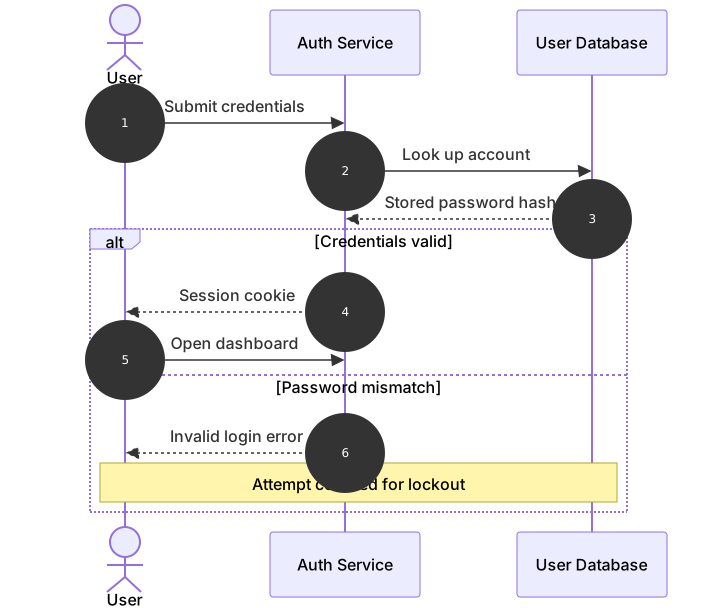
This template documents the credential check at the heart of every login page. The user submits an email and password, the auth service looks up the stored hash, and the outcome splits into two very different conversations: a success branch that issues a session cookie and opens the dashboard, and a failure branch that returns a generic error while quietly recording the attempt for lockout. Security teams use this diagram in reviews because the failure branch is where account takeover defenses live, and the generic error message is a deliberate choice worth defending in code review.
The syntax introduces conditional blocks. After the three lifelines are declared — actor U as User, participant A as Auth Service, participant D as User Database — the shared part of the flow runs unconditionally: U->>A: Submit credentials, A->>D: Look up account, and the dashed response D-->>A: Stored password hash. Then alt Credentials valid opens a conditional block. Everything between alt and else runs in the success case, everything between else and end runs in the failure case, and end closes the block. The condition text after alt and else is free-form, so plain English works. A Note over U,D inside the failure branch is legal and is the cleanest way to record a side effect that only happens on that path.
The gotcha is the missing end. Every alt needs exactly one matching end, and when you paste a block into a larger diagram it is easy to drop the closer — the parser then swallows every message below into the branch and the render looks inexplicably empty. If a diagram renders with messages missing, count your alt, loop, and end lines first. Also note that indentation is optional in Mermaid; it is used here purely so humans can see where the branches begin and stop.
To adapt it, add a second else for locked accounts, insert a rate limiter participant, or swap the cookie for a token pair if your client is a single-page app. Keep the error message generic in the label — the diagram should not advertise which part of the check failed.
Related templates: the api auth sequence shows the token flow that often follows a successful login, the auth session state diagram models the session’s states rather than its messages, and the websocket chat sequence shows the persistent connection a user opens after signing in. The sequence diagram guide covers alt and else in full.
Variations to try
- Add a second else branch for locked accounts that links to the password reset flow instead.
- Insert a rate limiter participant between the auth service and the database for public-facing apps.
- Change the success branch to issue a short-lived access token if your client is a single-page app.