Order Lifecycle Sequence
The code
sequenceDiagram
  autonumber
  actor C as Customer
  participant O as Order Service
  participant P as Payment Service
  participant W as Warehouse System
  C->>O: Place order
  O->>P: Authorize payment
  P-->>O: Payment held
  O->>W: Request fulfillment
  alt Items in stock
    W-->>O: Shipment scheduled
    O->>P: Capture payment
    P-->>O: Funds captured
  else Out of stock
    W-->>O: Backorder created
    O-->>C: Delay notification
  end
  Note over C,W: Order record updated at each step
How this template works
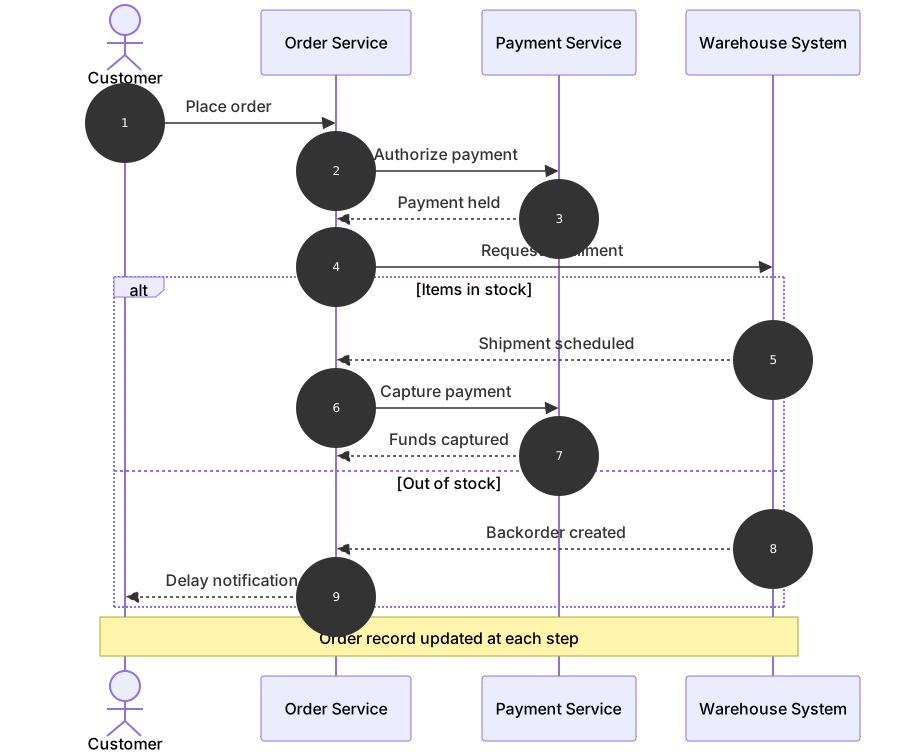
This template walks a single order through the services that handle it: the customer places the order, the order service authorizes payment without charging it, the warehouse is asked to fulfill, and only after the warehouse confirms stock does the service capture the money. The alt block then splits the ending — in-stock orders ship and capture, out-of-stock orders become backorders with a delay notification. Commerce teams use this diagram to align the payment team and the fulfillment team on the ordering of those steps, because almost every refund bug traces back to capturing before fulfillment was certain.
The syntax demonstrates authorize-then-capture as two separate exchanges. sequenceDiagram and autonumber set up the numbered conversation, and four lifelines are declared in call order: actor C as Customer, participant O as Order Service, participant P as Payment Service, and participant W as Warehouse System. The unconditional prefix runs the same way for every order: C->>O: Place order, O->>P: Authorize payment, the dashed P-->>O: Payment held, then O->>W: Request fulfillment. The alt Items in stock branch completes the happy path — the warehouse responds, and only then does O->>P: Capture payment release the held funds. The else Out of stock branch is deliberately shorter: a backorder record and a notification to the customer, with no capture at all. end closes the block, and Note over C,W: Order record updated at each step spans all four lifelines to record the persistence contract.
The gotcha is merging authorize and capture into one message. It renders fine, but it hides the exact window where the business holds someone’s money, and that window is what the diagram exists to show. The second trap is branch balance: both branches of the alt must leave the order in a state the caller can handle, and reviewers will read the diagram looking for exactly that. A missing end after the else branch swallows everything below it.
To adapt it, add a carrier participant for handoff tracking, insert a refund exchange if your policy cancels rather than backorders, or rename the services to your actual domain.
Related templates: the payment processing sequence zooms into the gateway conversation behind the authorize and capture steps, the order fulfillment flowchart draws the same process as a decision flow, and the order lifecycle state diagram models the order’s states instead of its messages. The sequence diagram guide covers every arrow and block type.
Variations to try
- Add a shipping carrier participant after the warehouse for teams that track handoff events.
- Insert a refund exchange in the failure branch if your policy cancels rather than backorders.
- Change the note to name the table or event stream where the order state is written.