Payment Processing Sequence
The code
sequenceDiagram
  autonumber
  actor C as Customer
  participant S as Storefront
  participant P as Payment Gateway
  participant B as Bank
  C->>S: Submit order
  S->>P: Create payment intent
  P-->>S: Client secret
  S->>P: Confirm with card details
  P->>B: Authorize charge
  B-->>P: Approved
  P-->>S: Payment succeeded
  S-->>C: Order confirmation
  Note over C,B: Funds captured in 2 days
How this template works
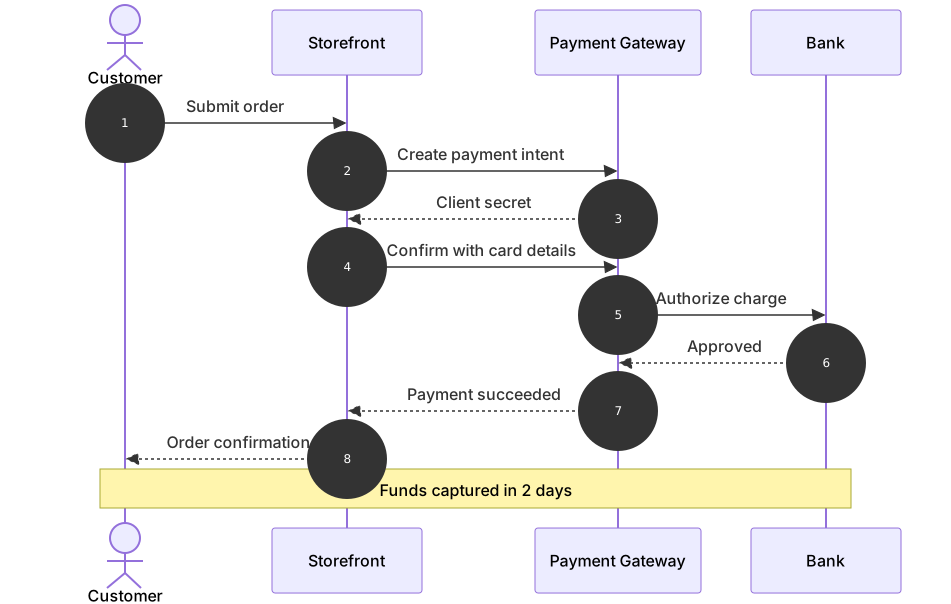
This template traces a card payment end to end: the customer submits an order, the storefront creates a payment intent with the gateway, the card details are confirmed, the bank authorizes the charge, and the confirmation travels back up the chain. The final note separates authorization from capture, which is the distinction that confuses most newcomers — approval at checkout only holds the money, and the actual charge lands later. Payments engineers use this diagram in incident reviews and integration docs, because every support escalation about a “missing” charge usually traces back to someone conflating those two steps.
The syntax demonstrates a four-party conversation with a clear depth order. sequenceDiagram opens the diagram and autonumber numbers each message for easy reference. The participants are declared in call order: actor C as Customer on the far left, then participant S as Storefront, participant P as Payment Gateway, and participant B as Bank on the right. Mermaid places lifelines left to right in declaration order, so the physical layout mirrors the call depth — the bank sits furthest away because it is the deepest hop. Requests use the solid arrow ->> and responses the dashed -->>; notice that the bank’s B-->>P: Approved is a response to the gateway, not to the storefront, and the dashed arrows make that return path unambiguous. The closing Note over C,B: Funds captured in 2 days spans every lifeline, marking a fact about the whole flow rather than one hop.
The gotcha is participant ordering. If you declare the bank before the storefront, the arrows will cross repeatedly and the diagram becomes unreadable even though it still parses. Declare lifelines in the order messages will touch them. Also keep ids unique and short — two participants aliased with the same letter merge into one lifeline, silently rerouting your money.
To adapt it, add the decline branch in an alt block, insert a fraud screening participant, or extend the flow with a refund exchange. Keep one business fact per message so the numbered steps stay quotable in tickets.
Related templates: the order lifecycle sequence shows the fulfillment steps that surround this payment, the api auth sequence covers securing the calls between storefront and gateway, and the webhook retry sequence documents how the gateway notifies you asynchronously afterward. The sequence diagram guide explains every arrow type.
Variations to try
- Add an alt block that handles a declined authorization and returns the customer to the card form.
- Insert a fraud screening participant between the gateway and the bank for high-value markets.
- Change the note to your real capture delay so finance and engineering read the same number.