WebSocket Chat Sequence
The code
sequenceDiagram
  autonumber
  actor A as Alice
  participant S as Chat Server
  actor B as Bob
  A->>S: Open websocket connection
  S-->>A: Connection accepted
  B->>S: Open websocket connection
  S-->>B: Connection accepted
  A->>S: Send message
  S->>B: Push message to Bob
  B->>S: Send read receipt
  S->>A: Push read receipt
  loop while room is open
    S->>A: Deliver presence updates
  end
  Note over A,B: Server keeps no message history
How this template works
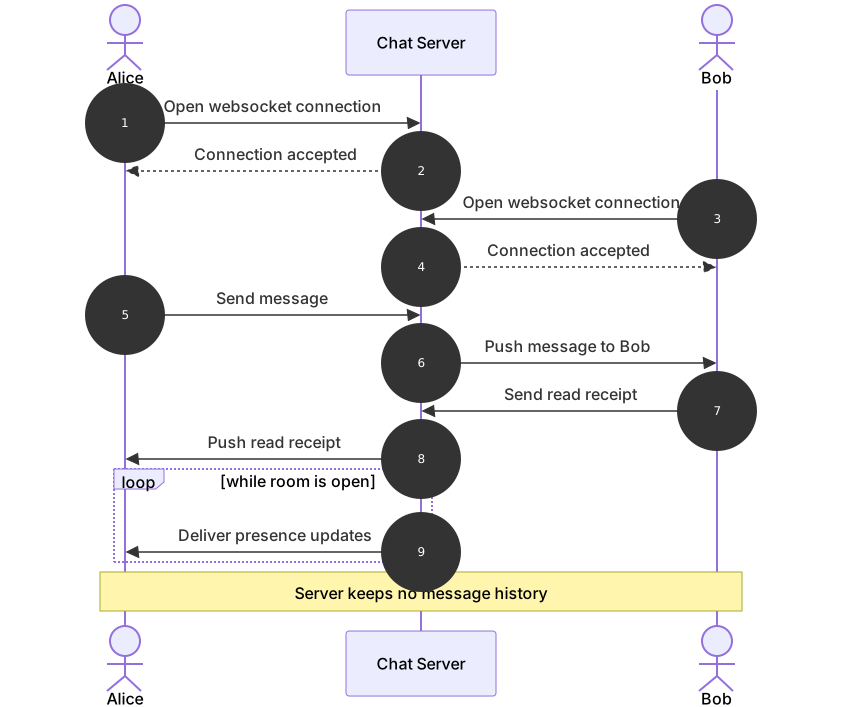
This template shows a realtime chat session built on websockets, where the direction of communication is the whole point. Two clients connect to the server once, and from then on the server pushes events to them without being asked — messages, read receipts, and presence updates all arrive unsolicited. That is the difference from every request-response diagram in this category, and it is why sequence diagrams work so well here: the arrows pointing from the server toward the clients make the push model visible at a glance. Realtime teams use it to document the protocol, and it is handy when debugging “why didn’t Bob get the message” incidents.
The syntax demonstrates actors on both sides of a server. sequenceDiagram and autonumber open the diagram, and the lifelines are declared in physical order: actor A as Alice, participant S as Chat Server, then actor B as Bob. Declaring an actor after a participant is completely legal — declaration order sets left-to-right position, so placing the server in the middle matches the star topology of a chat system. The connection setup is two request-response pairs: A->>S: Open websocket connection answered by the dashed S-->>A: Connection accepted, then the same pair for Bob. The message exchange shows the push semantics: Alice sends A->>S: Send message, and the server initiates S->>B: Push message to Bob — the arrow starts at the server because nobody asked Bob’s client for it. The read receipt flows back the same way. Then loop while room is open wraps S->>A: Deliver presence updates, modeling a stream that repeats for the life of the connection, closed by end. The final Note over A,B: Server keeps no message history spans both clients to record the retention policy.
The gotcha is the loop that never ends. A websocket session has no natural last message, so the loop block represents an open-ended stream; if you add messages after the loop, readers will assume they happen after the room closes. Put everything that happens during the session inside the loop or before it. Also remember every loop needs its own end, and the label after loop is free-form text rendered verbatim.
To adapt it, add a typing-indicator loop, insert an auth participant for the handshake check, or add a reconnect exchange if your client handles dropped connections.
Related templates: the login flow sequence covers the authentication that precedes the connection, the microservice call sequence shows the request-response alternative for non-realtime flows, and the api auth sequence documents the token the client presents during the handshake. The sequence diagram guide has the full syntax reference.
Variations to try
- Add a second loop around the message exchange to show typing indicators firing while a draft exists.
- Insert an auth participant between the clients and the server to document the handshake token check.
- Change the note to describe your retention policy if the server does persist message history.